Application Security
Application Security covers weaknesses in software your organisation builds or runs — web applications, mobile apps and thick clients. Findings arrive from code scanners, dynamic scanners and manual testing, and are tracked together against the application they affect.
Where findings come from
| Kind | Tools | What they see |
|---|---|---|
| Static (SAST) | Checkmarx, Fortify, Snyk Code | The source code. Finds flaws before the application runs. |
| Dynamic (DAST) | Burp Suite, Netsparker, Acunetix, AppScan | The running application, from the outside. |
| Composition (SCA) | Checkmarx SCA, Dependency Track, JFrog Xray | Third-party libraries and their known vulnerabilities. |
| Secrets | Gitleaks | Credentials committed into source control. |
| Manual | Your own testers | Anything the tools miss — logic flaws in particular. |
The same application usually has findings from several of these at once, which is the point: they see different things, and no single tool is sufficient.
Applications and audits
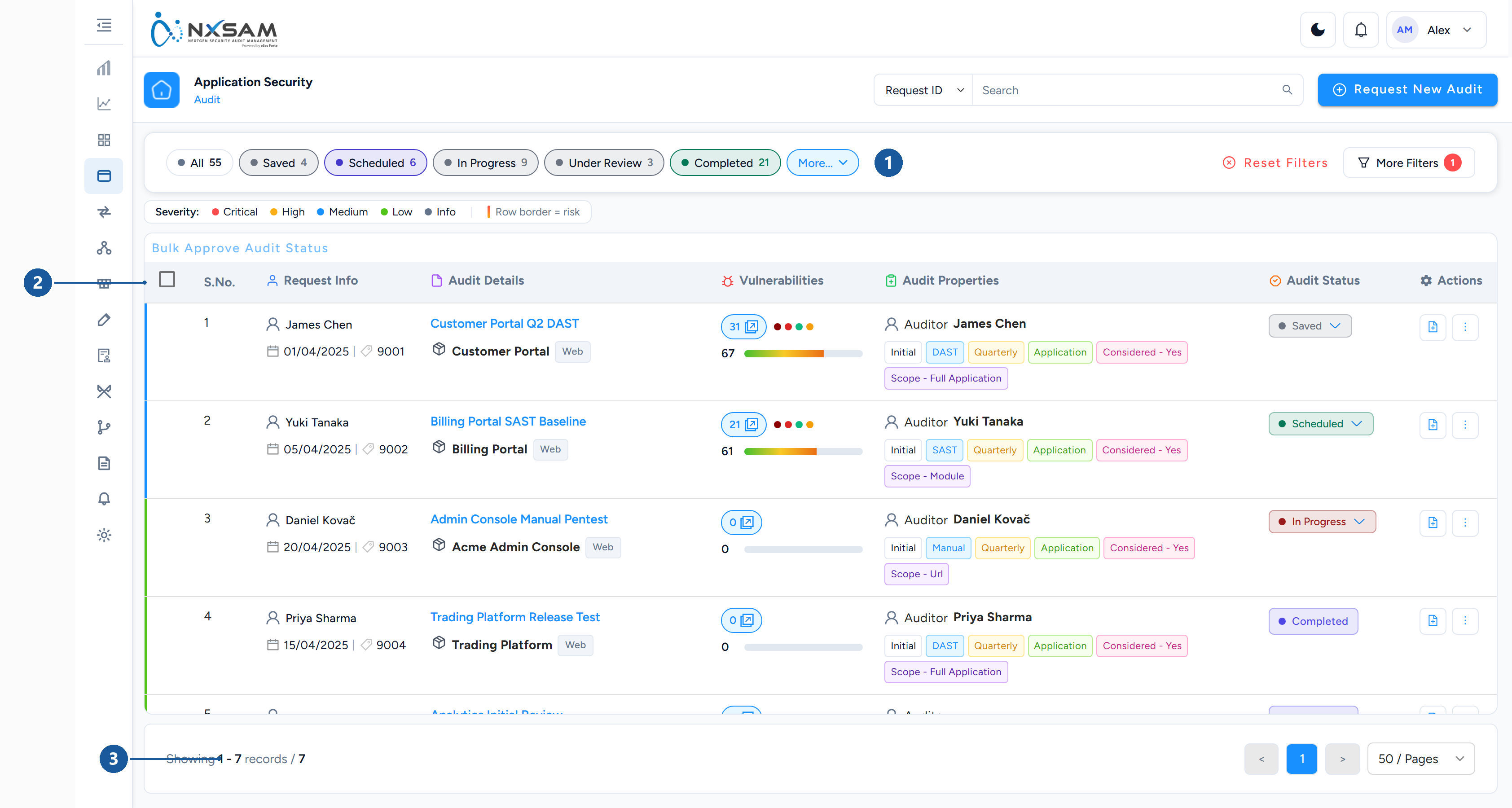
1 status filter chips · 2 what each audit records · 3 page size
An application is the thing you are protecting; an audit is one assessment of it. Applications persist; audits accumulate against them over time.
This is why the same application shows several audits, and why a finding always belongs to a specific audit — it records not only what is wrong but when and how it was discovered.
An application with many URLs or modules can be assessed as a whole or broken into parts, depending on how it was set up.
The working pattern
- An audit is created for the application.
- Findings arrive — imported from a tool, or entered by a tester.
- Each finding is reviewed and approved into the audit. Until then it is not counted in dashboards.
- Approved findings get an SLA by severity and become visible to the application owner.
- The owner fixes; a retest confirms; the finding is validated and closed.
Approval is a real step, not a formality
Findings awaiting approval are visible inside the audit but absent from dashboards and posture counts. If a colleague says "the dashboard is missing findings I can see", approval status is the first thing to check.
Severity and what to do first
Severity comes from the tool that reported it, mapped onto NxSAM's five levels. Tools disagree — the same weakness may be High in one scanner and Medium in another — so severity is a starting point, not a verdict.
Two things temper it in practice:
- Asset criticality. A Medium finding on a payment application usually matters more than a High on an internal wiki.
- Exploitability. Whether the weakness is reachable in your deployment.
False positives
Static scanners in particular report findings that are not genuine. NxSAM handles this two ways:
- Automatically at import, where the integration is configured with rules that classify certain findings as false positives on the way in.
- Manually, by marking a finding as a false positive after review.
Either way the finding is retained rather than deleted, so the decision is auditable and the same finding is not re-litigated after every scan.