RLCM — Regulatory & Line Compliance Management
RLCM is where compliance work lives. Where the security modules ask what is wrong with our systems, RLCM asks can we demonstrate that we meet our obligations — to a regulator, a standard, or an internal policy.
The building blocks
| What it is | |
|---|---|
| Control | A single thing you must do — "access is reviewed quarterly". The atom of compliance. |
| Template | A reusable set of controls, typically representing a standard or a regulation. |
| Audit | One assessment against a template, at a point in time. |
| Assessment | The act of going through an audit's controls and recording how you fare on each. |
| Finding | A control that is not adequately met. |
| Risk register | Risks arising from those gaps, tracked over time. |
| Framework | An external standard or regulation broken into its own requirements, each mapped to the controls that satisfy it. |
The relationship: a template defines controls; an audit applies a template to a part of your organisation; an assessment records the answers; findings capture the gaps; the risk register tracks what those gaps mean.
Why templates matter
Most organisations answer to several frameworks at once, and those frameworks overlap heavily. Templates let a control be defined once and reused, so evidence gathered for one obligation can serve another.
Master controls are maintained centrally, and templates draw on them. Improving a control definition improves every template using it.
Frameworks: answering many standards with one set of controls
Most organisations are held to several standards at once, and the standards overlap heavily — access review, incident response and change control appear in nearly all of them under different numbering. Assessing each standard separately means answering the same question several times and keeping several sets of evidence.
The Common Control Framework screens exist to avoid that. A framework is loaded as its own list of requirements — the clauses of the standard, with the standard's own reference codes — and each requirement is mapped to the controls in your library that satisfy it. You then assess the controls once, and every framework mapped to them reads the result.
Three things follow, and each has a screen:
- Frameworks — which standards you hold yourself to, their version, who issued them, how many requirements each has, and what proportion of those requirements are mapped to at least one control. That proportion is the framework's Compliance %.
- Requirements — the clauses of one framework, by section, each showing how many controls it is mapped to. A requirement mapped to nothing is a gap: a clause you are bound by and have no control for.
- Control map — for one requirement, the controls already mapped and the ones not yet mapped, with Map and Unmap between them.
Requirements can be typed in one at a time or uploaded as a CSV — the upload screen offers a sample file in the exact layout it accepts, and keeps a log of every upload with what it accepted and rejected.
Compliance % measures mapping, not passing
A framework at 100 % has a control for every requirement. It says nothing about whether those controls are met — that is what the assessments say. A framework can be fully mapped and badly failed, or thinly mapped and passing everything it covers. Read the two figures together.
How an audit runs
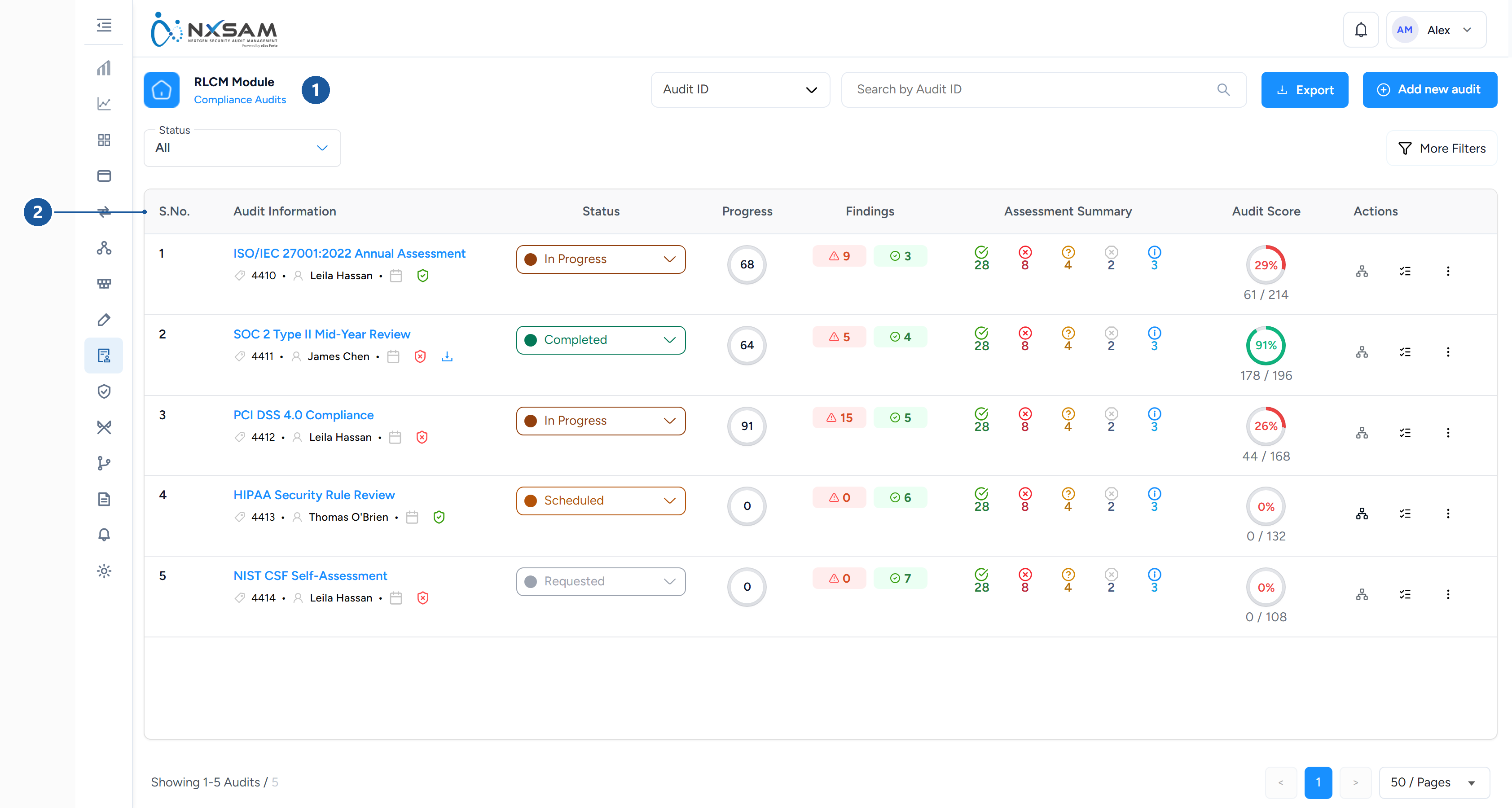
1 where you are · 2 audit and framework
- Create the audit from a template, scoped to whatever you are assessing.
- Assess each control — met, not met, partially met, or not applicable — with evidence and commentary.
- Raise findings where controls are not adequately met.
- Track remediation against those findings.
- Close the audit when the assessment is complete.
Audits recur. Last year's audit stays as the record of that point in time; this year's is a new audit against the same template, which is what makes trend and improvement visible.
Findings here are not vulnerabilities
An RLCM finding is a control gap — something you cannot yet demonstrate. It is not a technical weakness in a system, and it is tracked separately from the security modules.
The two are related in practice: a control requiring timely patching is demonstrated by the SLA performance the security modules record. But they are separate objects with separate lifecycles, and conflating them causes confusion in reporting.
Risk register
Where a control gap represents ongoing exposure, it is recorded as a risk: rated, owned, and tracked until treated. This is the bridge between "we do not meet this control" and "here is what that means for the business and who is dealing with it".
Getting started
If you are new to RLCM, the useful order is: look at an existing template to see how controls are structured, then open a completed audit to see how those controls were assessed and what findings resulted. The structure is much clearer from a worked example than from the configuration screens.