Reading the Network Security screens
VA and PT look similar and are structured completely differently, because they answer different questions. Knowing which is which saves most of the confusion in this module.
VA: a grid of counts, not a list of findings
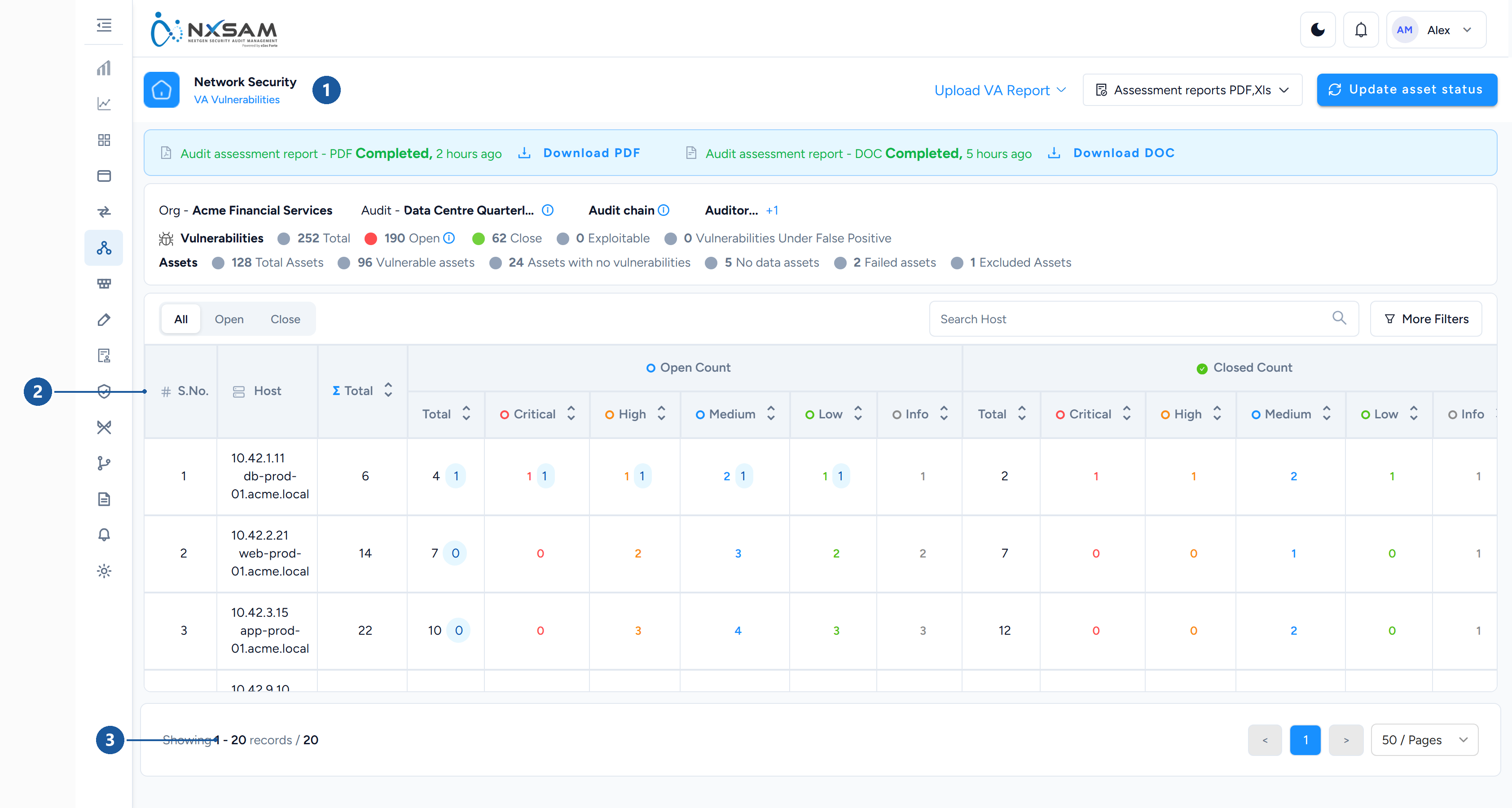
1 module and screen · 2 one row per host, counts per severity · 3 paging
The first thing to understand: one row is one host, not one finding. A scan of 200 machines produces 200 rows regardless of how many vulnerabilities it found.
The count columns
Each severity appears up to three times across the row, and the three mean different things:
| Column family | Meaning |
|---|---|
open_<severity> |
Currently open on this host at that severity |
closed_<severity> |
Closed on this host — fixed and confirmed by a later scan |
<severity>_exploitable |
Of the open ones, how many have a known exploit |
Plus Open, Closed and Total counts for the row.
The closed columns are hidden entirely when nothing on the screen is closed, so a column set that changes between two audits is the table adapting, not data disappearing.
Exploitable is the column to sort by
Severity says how bad the weakness is in theory. Exploitable says whether someone has already written the tool to use it. A host with two exploitable Mediums is a more urgent problem than one with six theoretical Highs, and the exploitable count is the only column that surfaces this.
Host name and IP
Both are shown because both are used for matching. If findings land against a host you did not expect, compare these two against the scanner's own record — short name against fully-qualified name is the usual cause.
Status, updated on, comments
Status is the host-level working state, Updated On is when it last changed, and Comments carries whatever the analyst recorded. Updated On moves when the status moves, not when the host was last scanned — those are different dates and are frequently confused.
PT: a list of findings with evidence
The penetration testing screen is closer to AppSec than to VA. One row is one finding, because a manual test produces tens of findings rather than thousands.
| Column | Notes |
|---|---|
| Track ID | Quote this in tickets |
| Issue title | What the tester found |
| Host and port | Where — a manual finding is usually specific to a port |
| Risk | The tester's rating, not a tool's score |
| Validation status | Whether the finding is agreed |
| Status | What is being done about it |
| Observation added | Whether the tester attached evidence |
| Document | The evidence itself |
Why PT has evidence and VA does not
A scanner finding is reproducible by re-running the scanner. A manual finding often is not — it may depend on a sequence of steps, a particular account, or timing. The observation and the attached document are the proof, and a PT finding without them cannot be verified by anyone but the original tester.
If a PT finding is disputed, the first question is whether an observation was recorded.
Risk acceptance on PT findings
The acceptance's comment and date appear directly on the row. A PT finding that has been accepted shows why and until when, without leaving the screen — useful during a review, and the reason accepted findings are not simply hidden.
Segmentation: neither of the above
Segmentation audits test whether network separation holds — whether a source can reach a
destination on a port it should not. Findings are about paths, not hosts or software, so
a finding reads as a source, a destination, a port and a protocol, with UDP Added and
TCP Added recording what became reachable.
The useful question here is not "how severe" but "was this path supposed to exist" — which is why the screen shows source and destination side by side rather than ranking by severity.
Which screen answers which question
| Question | Screen |
|---|---|
| Which machines are worst? | VA vulnerabilities |
| Which single patch helps most? | Overall vulnerability status |
| What exactly is this finding? | Vulnerability detail |
| What did the tester actually do? | PT vulnerabilities, with the observation |
| Did segregation hold? | Segmentation findings |
| Has the scan finished loading? | VA import queue |
The last one is worth checking before any of the others. A partly loaded scan looks identical to a complete smaller scan.