Reading the Container Security screens
Container findings behave unlike anything else in NxSAM, because the thing they are attached to is immutable. Most of the confusion in this module traces back to that one fact.
A finding is attached to an image, and an image never changes
payments/api:2.14.0 is a fixed artefact. You cannot patch it — you build
payments/api:2.15.0 and deploy that instead.
So:
- A finding on
2.14.0stays open on2.14.0forever. It is not "unfixed"; the image it describes still contains the vulnerability, and always will. - The fix appears as a new image with fewer findings, not as the old one improving.
- "Why is this still open after we fixed it?" is answered by checking which tag is deployed, not by checking the finding.
The vulnerability columns
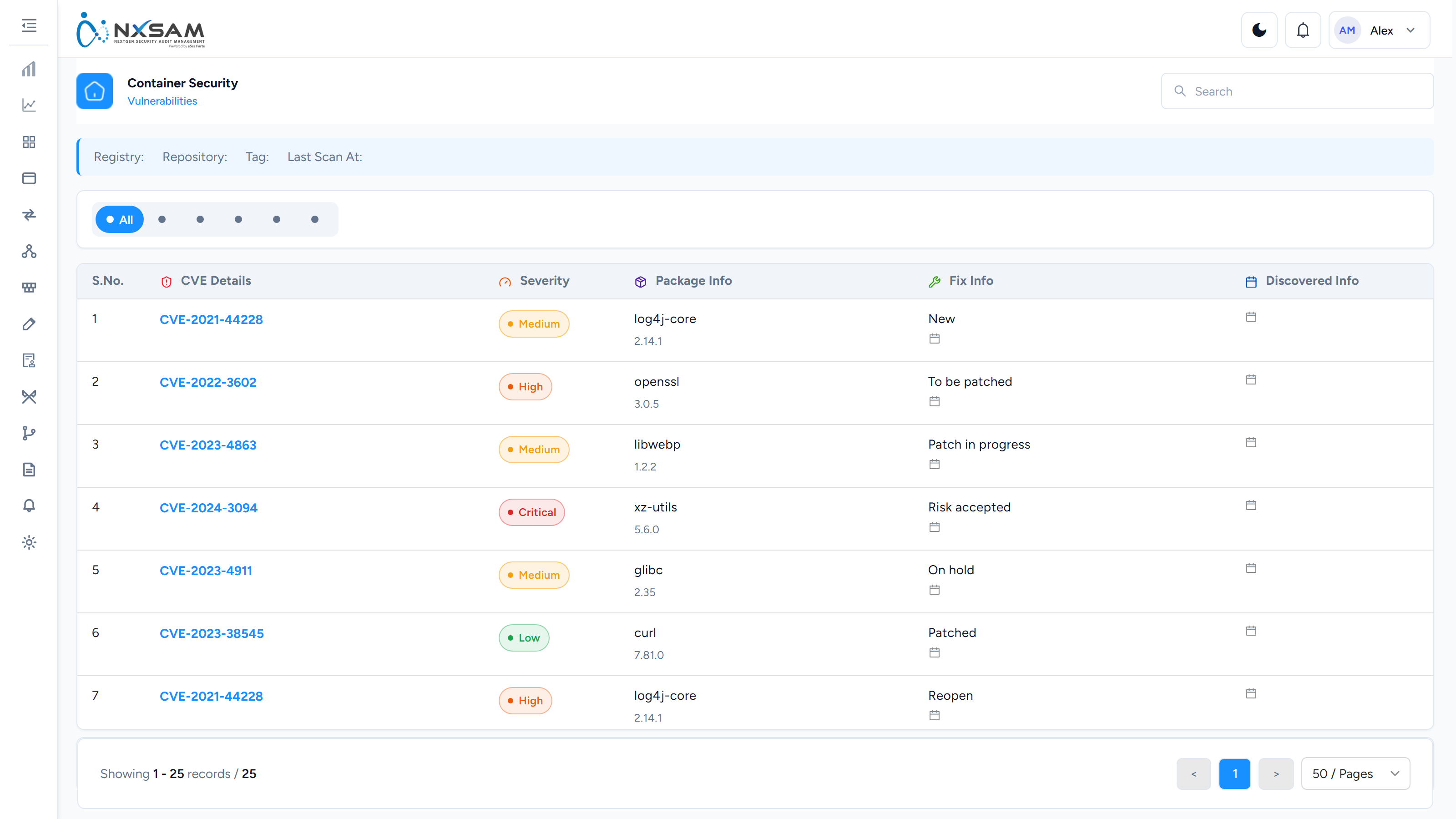
| Column | What it tells you |
|---|---|
| CVE | The advisory. Shared across every image containing the package |
| Registry / repository / tag | Which image. The tag is part of the identity |
| Package name and version | The actual cause. This is what you change to fix it |
| Collection | The workload grouping the image belongs to |
| Severity | From the scanner's advisory data |
| Vulnerability status | The working state of this finding |
| Master vulnerability status | The state of the underlying advisory across the estate |
| Vulnerability age | How long this has been known about |
| Discovered at / SLA expiry | When it was first seen here, and when it is due |
Two status columns again, meaning something different here
Status is this finding on this image. Master Status is the advisory itself, across every image it affects.
They diverge legitimately: a CVE can be triaged once at the master level — say, judged not applicable to your base images — while individual findings remain open until the images are rebuilt.
Package name is the column that matters
Severity ranks findings; package name groups them. Twenty Critical findings across twelve images are usually three packages, and updating three packages in the base image clears all twenty.
Sorting by package rather than severity is the single most useful habit in this module, and it is why the search screens exist:
- Container vulnerability search — findings across every image at once
- Container compliance search — the same for configuration checks
Both exist precisely because the per-image view hides the pattern.
Compliance is a different kind of finding
Vulnerabilities are weaknesses in packages inside the image. Compliance findings are how the image is built or run — running as root, no health check, a writable root filesystem, an over-permissive capability.
| Fixed by | |
|---|---|
| Vulnerability | Updating a package and rebuilding |
| Compliance | Changing the Dockerfile or the runtime configuration |
Compliance findings are usually cheaper to fix and apply uniformly, which makes them a good first pass on a new estate — one Dockerfile change can clear the same finding everywhere.
Collections
Images are grouped into collections, normally mirroring how the platform team organises workloads. Start here rather than with individual images: collections match how the people who will do the work think about their systems, and a finding assigned by collection reaches an owner who recognises it.
Why the counts move without a new scan
Same three causes as everywhere else, in the same order: SLA states changing with the date, a severity mapping edit re-classifying findings in bulk, or an image moving between collections and so between report scopes.
The container-specific fourth: a new tag was scanned. The old tag's findings did not go anywhere; a new set arrived alongside them. Totals rise even though the estate improved, because you are now tracking two images where you tracked one.
Retiring old tags is what stops that number growing forever, and nothing in the platform does it for you.